
Know what you sold, what is on the shelf and who owes you.
Budget Pro is the till, stock book and debt book for your shop — on your phone and your computer. Sell with or without internet, send receipts on WhatsApp, take mobile money, and see your real profit every evening.
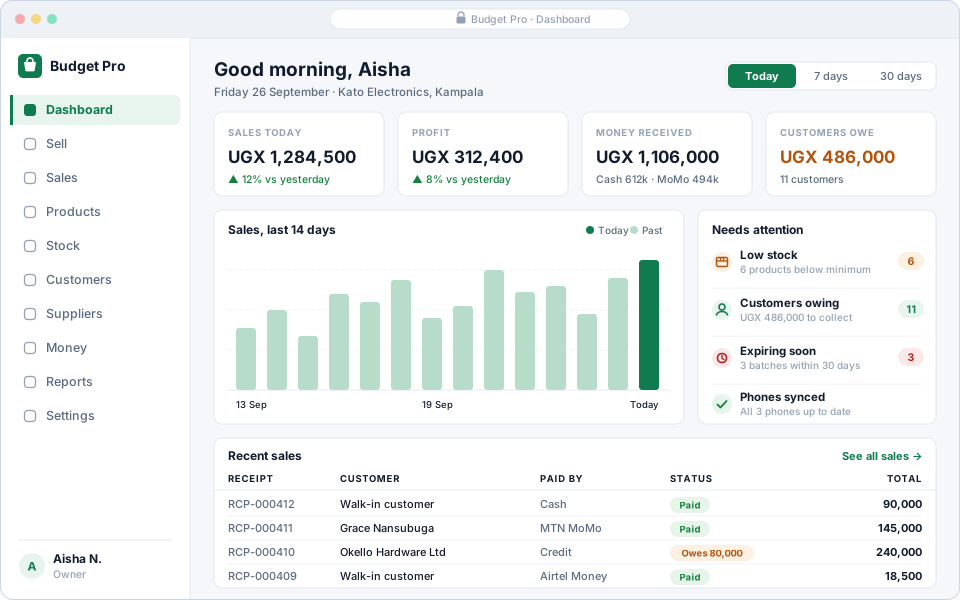
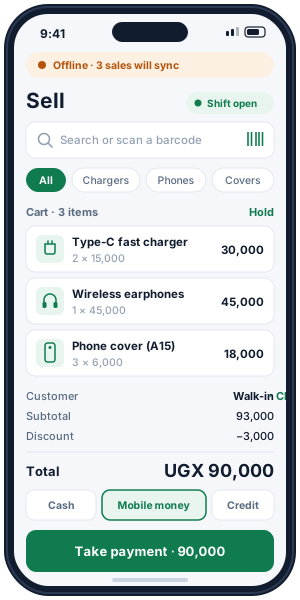
The dashboard on a computer and the till on a phone. Figures shown are examples.
Made for the shops on your street
From a one-counter kiosk to a wholesaler with several branches. Pick your kind of shop when you sign up and start from a ready list of products.
Everything the exercise book did, without the guesswork
One place for every sale, every item and every shilling owed — kept the same on every phone and computer in your shop.
Sell in seconds
Search or scan, then take cash, mobile money, card or credit — or split one sale across them. Print the receipt or send it on WhatsApp.
Stock you can trust
Every item in and out is recorded with its reason: sales, deliveries, damage, returns and counts. Low stock is flagged before the shelf is empty.
A debt book that chases for you
Sell on credit with a limit per customer, take part-payments, send reminders and see who owes what — and for how long.
Your real profit
Profit on every sale from your buying prices, minus your expenses. The same figures on the phone, the computer and the daily summary.
Staff without worry
Cashiers sell; only the people you choose see cost prices and profit. Every sale, void and stock change records who did it.
Suppliers under control
Purchase orders, deliveries received against them, what you owe each supplier, payments and returns of faulty goods.
Selling by this afternoon, in three steps
No server to buy, nothing to install on the computer, and no consultant to book.
Create your shop
Your shop's name, your phone number or email, and a password. No card. Your 14-day free trial starts straight away.
Add your products
Type them in, import a spreadsheet, or start from a ready list for your kind of shop. Set prices, pack sizes and opening stock.
Sell and watch it add up
Sell on the phone app or the computer. The dashboard, stock levels and debt book update with every sale.
The network goes. Your till doesn't.
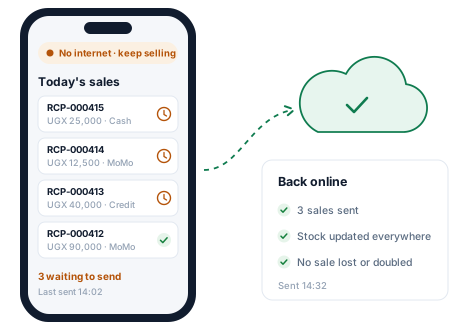
The Budget Pro app for Android keeps selling when there is no data, no signal or no power at the router. Sales, stock and customers are saved on the phone and sent the moment the connection returns.
- A finished sale is never thrown away. Money changed hands, so an offline sale is always accepted when it syncs.
- Several phones, one stock. Every phone and the computer see the same quantities once they sync.
- Always shows what is waiting. The app says how many sales are still to be sent.
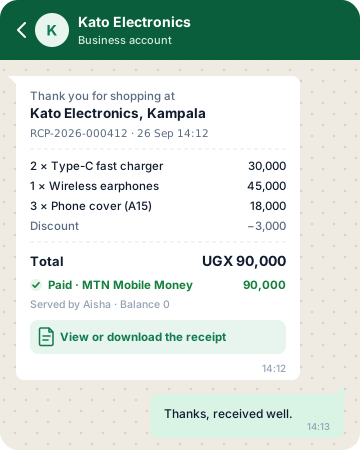
Receipts on WhatsApp. Payments on mobile money.
Customers get a proper receipt on their phone — no paper, no printer needed — with a secure link to view or download it. Record MTN Mobile Money, Airtel Money, cash, card and bank payments, even several on one sale.
- Your shop's name on every receipt, with the items, total, how it was paid and any balance.
- Money received, by method, so the evening cash-up matches the till and the mobile money statement.
- A daily summary on WhatsApp of the day's sales, and alerts when stock runs low (on plans that include it).
Stop losing money to “I'll pay on Friday”.
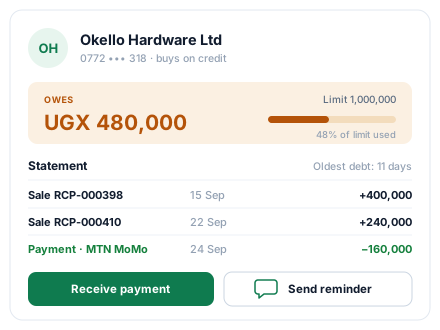
Every credit sale lands in the customer's account automatically. See the balance, the statement and the oldest unpaid sale, then take a payment or send a polite reminder in one tap.
- Credit limits so a customer cannot run up more than you allow.
- Part-payments against any sale, by any method.
- Who owes what, by age, so you chase the oldest debts first.
Private to your shop, backed up every night
Your records are yours. Here is how we keep them that way.
Only your shop sees it
Every record belongs to one shop and every query is filtered to it. Other shops cannot see or change your data.
Nightly backups
The whole database is backed up every night, and a restore is tested every week.
Roles for your staff
Owner, manager, cashier, stock keeper, accountant or viewer — each sees only what their job needs.
Nothing quietly deleted
Sales are voided, not erased, and stock is corrected with a new entry — so the history always adds up.
Start free. Pay when it pays for itself.
Every new shop gets a 14-day free trial. Pay monthly by mobile money or card, and change plan whenever you like.
- 100 products
- 2 team logins
- 200 sales a month
- 500 products
- 3 team logins
- 2,000 sales a month
- 5,000 products
- 10 team logins
- 20,000 sales a month
- Unlimited products
- Unlimited team logins
- Unlimited sales
Prices in Uganda shillings. See everything each plan includes.
What shop owners ask us first
Does it work without internet?
Yes. The Budget Pro phone app keeps selling offline: sales, stock and customers are saved on the phone and sent when the connection returns. A finished sale is never rejected when it syncs — if stock went below zero meanwhile, it is flagged for you to check instead.
Can I use it on my phone and my computer?
Yes, with one account. Use the Android app at the counter and the website on any computer or tablet browser — both show the same sales, stock and debts.
Can my cashier see my profit or buying prices?
Not unless you allow it. Each person gets a role: a cashier can sell and take returns, a stock keeper manages stock, an accountant sees the books. Cost prices and profit are only shown to roles that are allowed to see them.
What happens when the free trial ends?
Choose a plan and pay by mobile money or card. If you do nothing, your shop moves to the Free plan with its lower limits — nothing is deleted and you can upgrade at any time.
Can I bring my products from Excel?
Yes. Import a spreadsheet (CSV) of your products, or start from a ready-made list for your kind of shop and edit the prices.
Does it work with my receipt printer and barcode scanner?
The phone app prints receipts on thermal receipt printers, and every receipt can be saved as a PDF or sent on WhatsApp. On a computer, a USB barcode scanner types into the search box like a keyboard, so scanning just works.
Is my shop's information private?
Yes. Every record belongs to one shop and is filtered by shop on every request, backups run every night, and passwords are stored only as secure hashes. See the security page for details.
Open your shop on Budget Pro today
14 days free. No card, nothing to install on the computer, and your first sale in minutes.